
By Dana Mykytyn
Connecting Detector Testing and Reporting: How the XTR2 Integration Simplifies Inspections
Less manual entry. More connected workflows. Better visibility from testing to reporting.
Fire and life safety inspections involve more than testing devices. Technicians also need to capture results, document findings, and produce accurate reports that service providers and their customers can rely on.
When testing equipment and inspection software operate separately, that process can involve repetitive data entry, additional steps, and more opportunities for errors.
To help simplify this process, BuildingReports and Detectortesters have partnered to integrate XTR2, the all-in-one functional tester for smoke and heat detectors, with BuildingReports ScanSeries, connecting detector testing equipment with digital inspection reporting.
From Detector Testing to Digital Reporting
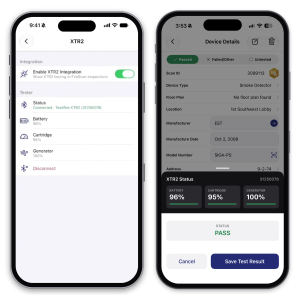
The integration uses Bluetooth technology to transfer pass/fail test results from XTR2 directly into ScanSeries.
Instead of manually transferring testing information between systems, technicians can capture results within their existing digital inspection workflow.
The result is a more connected process that reduces repetitive administrative tasks and allows technicians to spend more time focused on inspections.
What This Means for Your Inspection Team
For service providers managing multiple inspections, large facilities, or extensive device inventories, even small improvements to daily workflows can make a meaningful difference.
The XTR2 integration offers three practical benefits:
Less Manual Entry, More Efficient Inspections: Direct transfer of test results reduces the need to reenter information, helping technicians move more efficiently from testing devices to documenting findings.
Fewer Opportunities for Transcription Errors: Manually transferring results introduces opportunities for mistakes. Bluetooth connectivity helps reduce that risk by transferring test outcomes directly into the inspection software.
More Consistent Device-Level Documentation: Accurate inspection records help service providers communicate findings clearly and give building owners and facility managers the information they need to make informed maintenance and compliance decisions.
Why Connected Inspection Data Matters
Testing a detector is only part of the inspection process. Equally important is documenting the result and making that information accessible to those responsible for maintaining a building’s fire and life safety systems.
Connecting field testing equipment with digital reporting helps inspection information move more efficiently from the technician into the inspection record.
For service companies, this supports a more consistent reporting process. For building owners and facility managers, it contributes to the detailed device-level documentation they depend on to understand system conditions, address deficiencies, and plan maintenance.
Ultimately, better-connected workflows help turn inspection data into useful, actionable information.
Looking Ahead: Expanding Connected Inspection Workflows
The XTR2 integration marks the beginning of a broader partnership between BuildingReports and Detectortesters.
Both companies are exploring additional opportunities to connect field testing equipment with digital inspection reporting, including potential integrations involving sensitivity testing, aspirating smoke detection systems, and other specialized testing solutions.
These capabilities remain under consideration, with a shared focus on helping fire and life safety professionals work more efficiently while maintaining reliable inspection documentation.
Getting Started with the XTR2 Integration
The XTR2 integration is now available to BuildingReports Members, providing another way to simplify inspections and reduce manual reporting tasks.
To get started, technicians will need ScanSeries for iOS, version 2.42.0 or later. Connecting the XTR2 is simple and can be completed directly within the app:
- From the ScanSeries main screen, open Settings and select Detectortesters XTR2.
- Enable the integration and tap Pair Tester.
- Select your XTR2 from the list of nearby devices to connect automatically via Bluetooth.
Once connected, technicians can open FireScan and select Test with XTR2 when inspecting supported smoke, heat, multi-criteria, and multi-sensor detectors. ScanSeries automatically selects the appropriate test type for smoke and heat detectors, while multi-criteria and multi-sensor detectors offer additional testing options.
Technicians are encouraged to scan device barcodes before testing. XTR2 test results are then reflected in ScanSeries, preserving the existing pass status for successful tests and marking devices as failed when testing identifies a failure.
For XTR2 inquiries and further information, contact SDi.
Interested in other ways to simplify your inspection workflows? Explore our available integrations to see how BuildingReports connects with the tools your team already uses.
Ready to connect your detector testing and reporting workflows? Contact the BuildingReports Member Services team for assistance getting started.
Category: Building Inspections | News | Partnerships
Tags: Detectortesters | Integration | Partnership | XTR2
SHARE